Your core processes have no test coverage. Nobody on the team is going to build it.
We build parameterized test scripts for your core Business Central business processes — built to match how your team actually works, not how Microsoft’s demo data works. Then you run them in one click before every change goes into production — Microsoft’s, your ISVs’, your own — and we keep the ones we built working.
3 processes from $2,995 · 5 processes from $4,295 · scripts delivered as .yml files you own
What you are buying
What a business process means here
You buy coverage by business process. Each one expands into the scenarios your team actually runs.
Business Process
Order-to-Cash
→
Test Scenario
Post shipment, partial qty
→
Script
order-to-cash.yml
→
Step
Invoke “Post” on page 42
One business process typically expands to 3–8 test scenarios: the happy path, the partial shipment, the credit hold, the wrong-currency customer. So a 5-process pack is usually 20–40 scenarios — and with parameterization, far more validated runs.
Built around your team
Built the way you actually work
Two click paths, same posted result. A generic template only tests one of them — and it is usually the one your team never uses.
Path A — Microsoft’s demo path
New Sales Order from the Sales Orders list
Search → Sales Orders
Action bar → New
Fill Customer No., lines
Post → Ship and Invoice
Path B — how your order desk works
New Sales Order from the Customer Card
Search → Customers → open card
New Document → Sales Order
Customer pre-filled; add lines
Post → Ship and Invoice
Same posted sales invoice. Different pages, different actions, different places for a change to break something. Your users take Path B every day, so Path B is the script we build.
We don’t ship you a template. We watch how your team works, then build scripts that break when your process breaks — not when Microsoft’s demo data changes.
The multiplier effect
One script. Twelve rows. Sixty validated scenarios.
A recorded Page Scripting file tests one customer, one item, one quantity. We parameterize it so the same script runs against a data table — and every row is a scenario that would otherwise need its own recording.
1
Order-to-Cash script
×
5
parameter axes
×
12
data rows
=
60
validated scenarios
Row
Customer
Item
Location
Currency
Quantity
1
10000 Adatum Corporation
1896-S ATHENS Desk
MAIN
USD
1
2
10000 Adatum Corporation
1896-S ATHENS Desk
MAIN
USD
25
3
20000 Trey Research
1900-S PARIS Guest Chair
EAST
USD
4
4
20000 Trey Research
1920-S ANTWERP Conference Table
EAST
USD
2
5
30000 School of Fine Art
1928-S AMSTERDAM Lamp
MAIN
USD
12
6
30000 School of Fine Art
1896-S ATHENS Desk
WEST
USD
1
7
40000 Alpine Ski House
1900-S PARIS Guest Chair
MAIN
EUR
6
8
40000 Alpine Ski House
1964-S TOKYO Guest Chair
WEST
EUR
10
9
50000 Relecloud
1920-S ANTWERP Conference Table
EAST
GBP
1
10
50000 Relecloud
1928-S AMSTERDAM Lamp
MAIN
GBP
3
11
60000 Coho Winery
1996-S ATLANTA Whiteboard
WEST
USD
8
12
60000 Coho Winery
1896-S ATHENS Desk
EAST
USD
40
Each row exercises the same posting routine with different master data: a foreign-currency customer, a location with bin mandatory, a quantity that triggers a partial shipment. Five parameter axes across twelve rows validate sixty combinations of customer, item, location, currency and quantity from one maintained script. Knowing which axes matter for your data is what the discovery session is for — it is not something you get from watching a Microsoft demo.
How it works
Four steps from no coverage to every change validated
1
Discovery — one hour per process
Before the session, you record yourself doing the process once with Page Scripting and send us the recording. In the hour, we review it together and agree where the parameters belong and which scenarios matter. We also ask what changes around each process — which ISVs touch it, which extensions, which setups — so the validations check where a change is likely to land.
2
Build
We build and parameterize the scripts, add validations that check what the recording only clicked through, and map every scenario in a coverage matrix.
3
Baseline
First full run against your sandbox. You get the results report — pass/fail by scenario, step timing, video — and a 60-minute handoff session.
4
Ongoing — Update Validation
Run the scripts in your sandbox before every change goes into production — Microsoft previews and releases, ISV updates, extensions, setup changes. When a page changes or an action moves, we repair the scripts we built; if your process itself changes, the script changes with it ($350 per script). You see the result before your users notice anything.
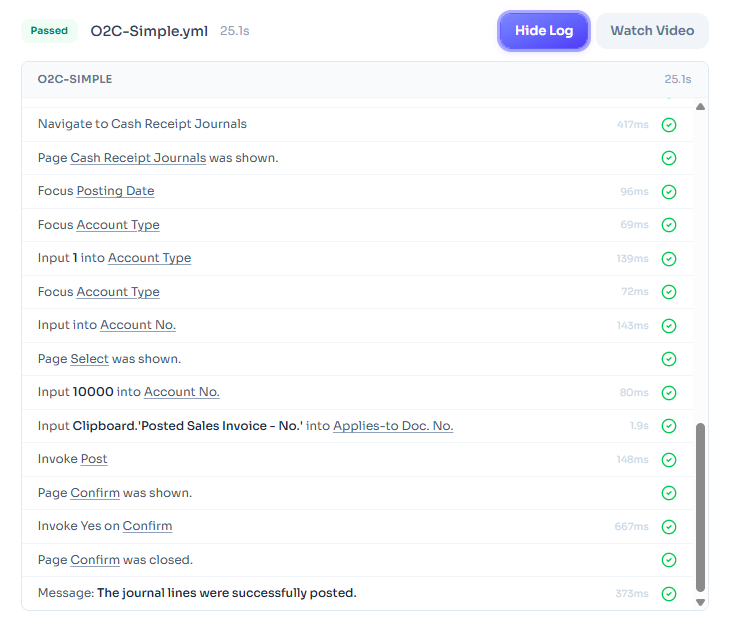
What every run gives you: each step of the business process logged with timing, plus a video of the run. (Demo run on Cronus.)
Pricing
Build coverage once. Validate every change.
Two parts: a one-time Coverage Pack that builds your scripts, and an Update Validation subscription that keeps them running through every change.
1 — Setup: Coverage Pack (one-time)
3 Processes
$2,995 one-time
Three business processes, scripted and parameterized
Discovery3 × 1 hour
Scripts built3
Your own scriptsUnlimited
Script repairIncluded when your process is unchanged
No setup fee. Upload and run unlimited Page Scripting scripts on the platform. You maintain them; repair is available at $350 per script. Subscription rates as below.
Every path includes it. Run your scripts in one click before any change goes into production — Microsoft previews and releases, ISV updates, extensions, setup changes. We repair the scripts we built when only the path moves; process changes are $350 per script.
$200/month per company
Billed annually · $2,400 total commitment
$240/month per company
Billed semiannually · $1,440 total commitment
A six-month term spans one Microsoft release cycle, preview included, and every change you make in between. Twelve months covers both waves at the lower rate.
Unlimited one-click runs — before any change goes into production
Video of every run, step-level logs
Run history and pass/fail trends
Repair of scripts we built (process unchanged)
Unlimited scripts on every plan
Priority email support
Example: 5 Processes + 12-month Update Validation = $4,295 today, then $200/month per company.
Scope
What’s included, what’s not
Included
Discovery sessions, one hour per business process
Script build and parameterization
Coverage matrix: scenarios mapped to processes
Baseline run report
60-minute handoff session
Scripts delivered as .yml files the customer owns
Not included
Remediation of issues the tests find
AL code changes
Configuring or fixing ISV apps (testing business processes that run through them is included)
Performance or load testing
Processes requiring data that doesn’t exist in the sandbox
Maintenance of scripts we didn’t build
Integrations with external systems
Permission-set testing (on the roadmap)
Adjusting a script when your process changes ($350 per script)
Before we start
Prerequisites
These are your side of the build. The delivery clock starts when they are met.
Sandbox environment refreshed from production
Representative master data that can be posted against — customers, items, locations, open periods
One named SME available for the discovery sessions
Environment access and test user credentials provisioned
A rough Page Scripting recording of each process, sent before its discovery session
Questions
Frequently asked
What happens when a page changes?
Whether Microsoft, an ISV or your developer changed it, the affected step fails and you see it on video — in your sandbox, before the change reaches production. Script repair is included when an update — Microsoft’s, an ISV’s or your own — changes how a script reaches a page but your process steps stay the same. When the process itself changes (a new step, a different page), the script changes with it: $350 per script, whatever caused it.
A test failed after our change. Bug or repair?
The video and step log show which. If the business process can’t complete, that’s a finding — yours or your partner’s to fix. If the process still works and only the path moved, that’s a repair.
Who owns the scripts?
You do. Every script is delivered as a Page Scripting .yml file in your account. If you leave, the scripts leave with you and still run in BC’s built-in tool.
What if our process changes?
If your team changes how it works — a new approval step, a different posting page — that is a scope change, not a repair. Small changes are usually covered by an additional discovery session ($350); larger ones are quoted as new processes.
Why not just use the free Page Scripting tool ourselves?
You can, and Bring Your Own Scripts exists for exactly that. The tool records one path with one set of data. Parameterization, validations beyond click-through, a coverage matrix and repair when a page moves are the work — and the part nobody internally has time to own.
What counts as one business process?
One end-to-end flow with one posted outcome: Order-to-Cash, Procure-to-Pay, a bank reconciliation, a month-end close routine. Each expands to 3–8 scenarios. The Process Library lists the eight standard ones and the rule for when a process is Custom.
Can we upload our own scripts too?
Yes — unlimited, on any plan. We maintain the ones we built; you maintain yours. Repair of a customer-authored script is available at $350 per script.
What if we edit a script you built?
It becomes yours to maintain from that point. Script repair covers scripts in the state we delivered them; if an edited script breaks, repair is $350 per script or we can rebuild it in the next discovery session.
Get coverage before the next change
3 processes for $2,995. 5 processes for $4,295. Custom scoped in one call.